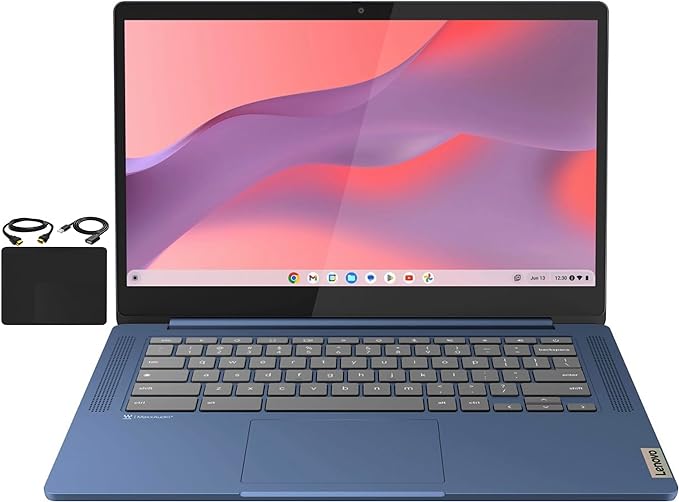
Lenovo Flagship Chromebook 14 (Kompanio 520, 4GB RAM, 64GB eMMC)
* Price is based on the Amazon price at the time of writing and may change over time.
Quick Summary
Buy if:
At roughly $175, this Lenovo IdeaPad Slim 3 Chromebook offers excellent value for students, kids and casual users who mainly need a simple, secure laptop for browsing, school assignments and streaming. If you confirm that you are getting the FHD configuration you want (touch or non-touch) and accept the 4GB RAM and 64GB eMMC limits, it delivers a surprisingly nice screen, very good battery life and silent operation for not much money.
Skip if:
If you are a power user, plan to run many tabs or heavy web apps, or want to use Linux tools and IDEs, this Kompanio 520 and 4GB RAM combination will feel restrictive. Likewise, if you absolutely need a guaranteed touchscreen or more robust build quality and support, it is worth stepping up to a better-specced Chromebook with 8GB RAM, faster Intel or AMD silicon and clearer model labeling.
Should You Buy It?
✓ Good For
At roughly $175, this Lenovo IdeaPad Slim 3 Chromebook offers excellent value for students, kids and casual users who mainly need a simple, secure laptop for browsing, school assignments and streaming. If you confirm that you are getting the FHD configuration you want (touch or non-touch) and accept the 4GB RAM and 64GB eMMC limits, it delivers a surprisingly nice screen, very good battery life and silent operation for not much money.
✗ Not For
If you are a power user, plan to run many tabs or heavy web apps, or want to use Linux tools and IDEs, this Kompanio 520 and 4GB RAM combination will feel restrictive. Likewise, if you absolutely need a guaranteed touchscreen or more robust build quality and support, it is worth stepping up to a better-specced Chromebook with 8GB RAM, faster Intel or AMD silicon and clearer model labeling.
📊 Specifications
▼-
Display
14.0-inch FHD (1920×1080) IPS, anti-glare, 300 nits, wide viewing angles, touchscreen on some configurations
-
Processor
MediaTek Kompanio 520 (MT8186) octa-core up to 2.05 GHz
-
Memory
4GB LPDDR4x-3733 (soldered, non-upgradable)
-
Storage
64GB eMMC 5.1 flash storage
-
Graphics
Integrated ARM Mali-G52 2EE MC2 GPU
-
Wireless
Wi‑Fi 6 (802.11ax 2×2) + Bluetooth 5.1
-
I/O
1x USB-A 3.2 Gen 1; 1x USB-C 3.2 Gen 1 (data, Power Delivery 3.0, DisplayPort 1.1a); 1x microSD card reader; 1x 3.5mm headphone/microphone combo jack; 1x Kensington Nano security slot
-
OS
Chrome OS
Specs are based on Lenovo IdeaPad Slim 3 Chromebook Gen 8 (14-inch MTK, M868 platform) with Kompanio 520, 4GB LPDDR4x and 64GB eMMC. The series has multiple display options (HD or FHD, TN or IPS, touch or non-touch); this Amazon configuration is advertised as 14-inch FHD IPS, typically with multi-touch, but some retailers have shipped non-touch variants despite touchscreen listings. RAM is soldered and not upgradeable; internal storage is limited but can be expanded via microSD. Dimensions and weight (about 12.83 x 8.73 x 0.73 inches, 1.3 kg) are taken from Lenovo documentation and may differ slightly from some reseller descriptions.
Pros & Cons
Advantages
Sharp 14-inch FHD IPS display with good brightness and color, unusually nice for a budget Chromebook and great for web and video.
Very good battery life from the efficient MediaTek Kompanio 520 and 47Wh battery, often lasting a full school or work day between charges.
Lightweight, fanless design around 1.3 kg stays cool and virtually silent, making it comfortable for students and shared spaces like classrooms or living rooms.
Excellent value around $175 for a modern Chromebook with Wi‑Fi 6, decent build quality and a roomy 14-inch screen.
Chrome OS is easy to set up and maintain, with fast boot times, automatic updates and strong built-in security for casual users.
Disadvantages
Only 4GB of RAM and an entry-level Kompanio 520 CPU – fine for light browsing and schoolwork but can feel slow with many tabs or heavier web apps open.
64GB eMMC storage is small and not upgradeable; you will likely lean on Google Drive or a microSD card for photos, downloads and large files.
Touchscreen availability varies by SKU, and many buyers report receiving non-touch units despite touchscreen advertising – double-check the exact model and configuration before ordering.
User reviews mention quality-control and reliability issues on some units (stuck keys, devices dying after a few days, inconsistent battery life), so buying from a seller with a strong return policy is important.
Port selection is minimal – only one USB-C and one USB-A and no HDMI – so you may need a USB-C hub or adapter for external monitors and multiple peripherals.
Who Is This For?
| Use Case | Rating | Notes |
|---|---|---|
| Office / Documents | Handles Google Docs, Sheets, Gmail and other web-based productivity apps smoothly for light to moderate school and office work. | |
| Web Browsing | Comfortable for a modest number of tabs, but 4GB RAM and an entry-level ARM CPU can cause slowdowns and freezes if you open many tabs or heavy sites at once. | |
| Video Streaming | The FHD IPS panel and hardware video decoding make YouTube and Netflix in 1080p look sharp and play smoothly, ideal for casual streaming. | |
| Video Calls | 720p webcam with privacy shutter and dual mics is fine for Zoom or Google Meet, but image and audio quality are basic and some users report defective units. | |
| Photo Editing | Good color FHD IPS display suits light, web-based photo editing, but limited RAM and CPU power make it unsuitable for large RAW files or heavy editing sessions. | |
| Video Editing | Entry-level ARM hardware and 4GB RAM struggle with anything beyond very simple cloud-based trimming or short clips; not recommended for real video editing. | |
| Gaming | Adequate only for casual Android and browser games at low settings; not suitable for demanding 3D titles or serious gaming. | |
| Programming | OK for browser-based coding lessons and lightweight scripts, but 4GB RAM and the ARM SoC are limiting for full IDEs, Linux containers or heavier development workloads. | |
| Quiet Operation | Fanless Kompanio 520 design means the Chromebook runs virtually silent under normal use, with only occasional noise from the speakers. | |
| Portability | Around 1.3 kg with a slim 14-inch chassis and long battery life, making it easy to carry between classes, rooms or on a commute. |
FAQ
Alternatives to Consider
Official Lenovo Japan configuration of the same Slim 3 Chromebook with a 14-inch FHD IPS touchscreen, Kompanio 520, 4GB RAM and 64GB eMMC, plus longer local warranty and clearer model labeling than many marketplace listings.
A 12.2-inch convertible Chromebook with a 360-degree touchscreen, Intel N100 processor and more ports (including HDMI). Better suited if you want tablet-style use and easier external monitor connectivity, and are comfortable with a smaller display.
More premium 13.3-inch convertible Chromebook with a Snapdragon 7c platform, 8GB RAM and a high-quality FHD touch display. Offers smoother multitasking and a nicer build, but costs significantly more than this Lenovo budget model.
Final Verdict
Bottom Line
A very affordable 14-inch Chromebook with an unusually good FHD IPS display, long battery life and silent, fanless operation, but held back by just 4GB of RAM, limited storage and inconsistent experiences around the advertised touchscreen and reliability.
Recommended for: Students, casual home users and Chromebook beginners who want an inexpensive, quiet laptop for web browsing, school assignments and streaming, and who are willing to verify the exact configuration and live within the 4GB/64GB limitations.