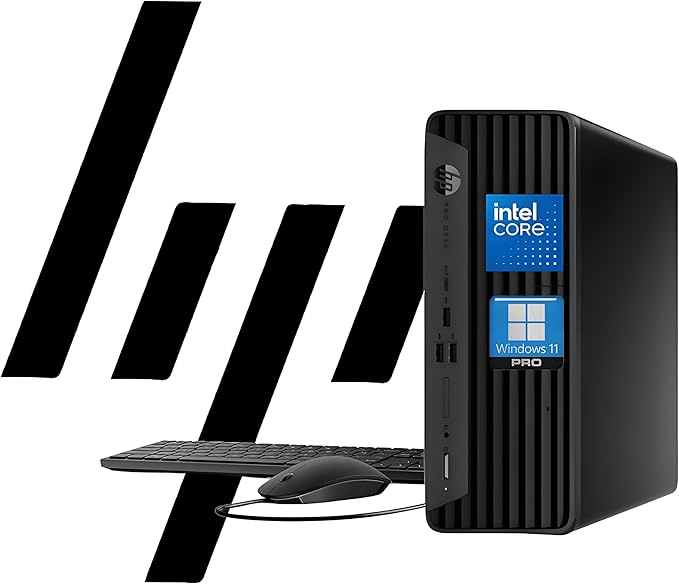
HP ProDesk 400 G9 SFF Business Desktop (Intel Celeron G6900, 32GB RAM, 1TB PCIe SSD, Windows 11 Pro)
* Price is based on the Amazon price at the time of writing and may change over time.
Quick Summary
Buy if:
Buy it if your workload is mainly Office apps, web apps, and streaming, and you like the value of getting 32GB RAM + 1TB SSD in a compact HP business SFF chassis with Windows 11 Pro.
Skip if:
Skip it if you expect “fast” performance for demanding tasks (editing, VMs, large code builds) or if you need better gaming capability; consider a Core i5/Ryzen 5 model instead.
Should You Buy It?
✓ Good For
Buy it if your workload is mainly Office apps, web apps, and streaming, and you like the value of getting 32GB RAM + 1TB SSD in a compact HP business SFF chassis with Windows 11 Pro.
✗ Not For
Skip it if you expect “fast” performance for demanding tasks (editing, VMs, large code builds) or if you need better gaming capability; consider a Core i5/Ryzen 5 model instead.
📊 Specifications
▼-
Display
No monitor included; video outputs typically include DisplayPort 1.4a + HDMI 1.4 (dual-display support; seller also claims dual 4K).
-
Processor
Intel Celeron G6900 (2 cores / 2 threads, 3.40 GHz base, 4MB cache)
-
Memory
32GB DDR4 (exact speed/configuration varies by seller; listing claims configurable up to 64GB)
-
Storage
1TB PCIe M.2 SSD
-
Graphics
Intel UHD Graphics 710 (integrated)
-
Wireless
Wi‑Fi (module/version not specified; configuration-dependent) + RJ‑45 Gigabit Ethernet
-
I/O
Front: USB Type‑C (USB 3.2 Gen 2) x1, USB Type‑A (USB 3.2 Gen 2) x3, 3.5mm headset combo. Rear: DisplayPort 1.4a x1, HDMI 1.4 x1, USB Type‑A (USB 3.2 Gen 1) x3, USB 2.0 Type‑A x2, RJ‑45, audio line-out, power connector. Wired keyboard & mouse included (per listing).
-
OS
Windows 11 Pro
Specs are compiled from the Amazon listing plus HP’s Pro SFF 400 G9 port layout; exact USB counts/options and the Wi‑Fi card can vary by configuration/seller. HDMI is listed as HDMI 1.4 on the chassis, which may limit 4K output/refresh vs DisplayPort—verify your monitor needs before purchase.
Pros & Cons
Advantages
Excellent RAM/SSD value for the price: 32GB DDR4 and a 1TB PCIe SSD is a very usable baseline for office workloads.
Compact HP Small Form Factor chassis: easy to fit on or under a desk and generally “business PC” practical.
Good wired connectivity: includes RJ‑45 Ethernet plus multiple USB ports and both DisplayPort + HDMI.
Windows 11 Pro: better fit for business features (BitLocker/domain scenarios) than Home editions.
Disadvantages
Very low-end CPU: the Celeron G6900 is fine for basics, but it’s not ideal for heavy multitasking, creative work, or VMs.
Wi‑Fi complaints are common: reviews mention weak/unstable internal Wi‑Fi—Ethernet or a better adapter may be needed.
No VGA: if you have an older monitor, you’ll need an adapter or a different display connection.
Gaming claims in reviews may be misleading: UHD 710 is entry-level iGPU; expect casual/older titles only at low settings.
Who Is This For?
| Use Case | Rating | Notes |
|---|---|---|
| Office / Documents | Fast boot and smooth Office work thanks to 32GB RAM + SSD; CPU is sufficient for typical business apps. | |
| Web Browsing | Good for everyday browsing, but the dual-core CPU can feel limited with many heavy tabs/web apps. | |
| Video Streaming | Integrated graphics handles streaming well; DisplayPort is the safer choice for higher-res displays. | |
| Video Calls | Performance is fine for Zoom/Teams, but a webcam/headset isn’t included and Wi‑Fi may be inconsistent for some users. | |
| Photo Editing | Light edits are workable (RAM helps), but RAW workflows and large batches will be slow on this CPU. | |
| Video Editing | Dual-core Celeron + basic iGPU makes editing and exporting slow; not recommended for regular video work. | |
| Gaming | Intel UHD 710 is for casual/older games; modern AAA gaming performance will be poor. | |
| Programming | Fine for basic coding and small projects; not great for heavy builds, Docker-heavy workflows, or multiple VMs. | |
| Quiet Operation | SFF business desktops are typically tuned for quiet office use; reviews mention it being very quiet. | |
| Portability | It’s a desktop tower (even if compact) and needs external monitor/peripherals for travel use. |
FAQ
Alternatives to Consider
Same business SFF idea but with a much faster CPU for heavier multitasking and longevity.
Comparable business-class desktop with stronger CPU options and broad enterprise support ecosystem.
Smaller and cheaper; good for basic use, but typically less upgradable and not as “enterprise desktop” oriented.
Final Verdict
Bottom Line
A practical, compact HP business desktop that offers standout RAM/SSD value, but its dual-core Celeron CPU and mixed Wi‑Fi feedback keep it from being a universal recommendation.
Recommended for: Home/office users who want a compact Windows 11 Pro desktop for basic productivity and prefer Ethernet (or don’t mind upgrading Wi‑Fi).