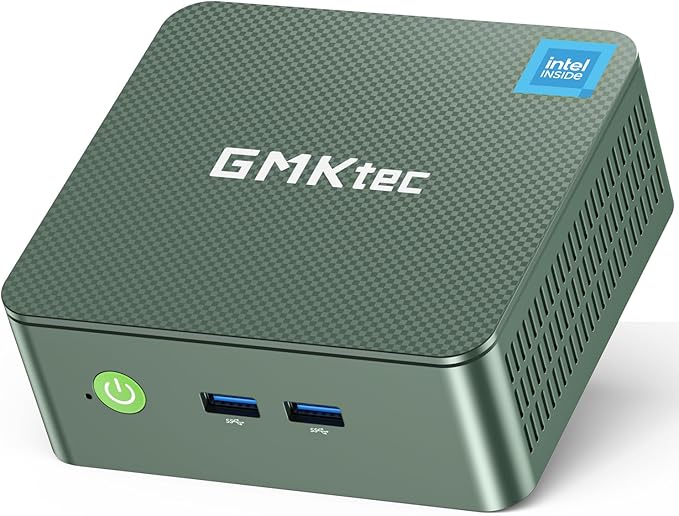
GMKtec NucBox G3 Plus Mini PC (Intel N150, 16GB RAM, 512GB SSD)
* Price is based on the Amazon price at the time of writing and may change over time.
Quick Summary
Buy if:
Recommended for budget-conscious home server builders, media PCs, and light office users who value low power draw, 2.5GbE networking, and small size more than raw performance.
Skip if:
Power users, serious gamers, or those who prioritize top-tier reliability and support should consider a higher-end Ryzen or Core i5/i7-based mini PC instead.
Should You Buy It?
✓ Good For
Recommended for budget-conscious home server builders, media PCs, and light office users who value low power draw, 2.5GbE networking, and small size more than raw performance.
✗ Not For
Power users, serious gamers, or those who prioritize top-tier reliability and support should consider a higher-end Ryzen or Core i5/i7-based mini PC instead.
📊 Specifications
▼-
Display
No built-in display; dual HDMI 2.0 outputs up to 4K@60Hz
-
Processor
Intel Processor N150 (Twin Lake, 4 cores / 4 threads, up to 3.6 GHz, 6 MB cache, 6W TDP)
-
Memory
16GB DDR4-3200 SO-DIMM (1×16GB, 1 slot, up to 32GB)
-
Storage
512GB M.2 2280 PCIe 3.0 NVMe SSD (plus M.2 expansion slots)
-
Graphics
Intel UHD Graphics (integrated, up to 1000 MHz, 4K AV1 decode, dual HDMI 2.0)
-
Wireless
Wi‑Fi 6 (802.11ax, Realtek 8852BE), Bluetooth 5.2
-
I/O
Front: 2× USB 3.2 Gen1 Type‑A, power button; Rear: 2× USB 3.2 Gen1 Type‑A, 2× HDMI 2.0 (4K@60Hz), 1× 2.5GbE RJ45 (Intel i226V), 1× 3.5mm audio jack, DC 12V‑in, VESA mount support
-
OS
Windows 11 Pro
Manufacturer lists Intel Twin Lake N150 (4C/4T, up to 3.6 GHz, 6 W TDP) with DDR4‑3200 SO‑DIMM (up to 32GB) and NVMe M.2 2280 storage plus an additional M.2 2242 SATA slot, and Wi‑Fi 6 + Bluetooth 5.2.([de.gmktec.com](https://de.gmktec.com/en/products/gmktec-nucbox-g3-plus-intel%C2%AE-twin-lake-n150?variant=50663568572600)) Official sources disagree on the exact chassis weight (roughly 270–528 g), so it is left unspecified here.
Pros & Cons
Advantages
Very good value: modern Intel N150, 16GB RAM, and a 512GB NVMe SSD at a budget mini‑PC price, often under US$250.([de.gmktec.com](https://de.gmktec.com/en/products/gmktec-nucbox-g3-plus-intel%C2%AE-twin-lake-n150?variant=50663568572600))
Excellent connectivity for home server and desktop use, including 2.5GbE (Intel i226V), Wi‑Fi 6, Bluetooth 5.2, and dual HDMI 2.0 for dual 4K displays.([de.gmktec.com](https://de.gmktec.com/en/products/gmktec-nucbox-g3-plus-intel%C2%AE-twin-lake-n150?variant=50663568572600))
Compact, VESA‑mountable chassis that stays quiet under typical office and media workloads, according to many user reviews.
Upgradeable design with a single DDR4 SO‑DIMM slot (up to 32GB) and extra M.2 slots for additional NVMe or SATA SSDs.([de.gmktec.com](https://de.gmktec.com/en/products/gmktec-nucbox-g3-plus-intel%C2%AE-twin-lake-n150?variant=50663568572600))
Ships with Windows 11 Pro preinstalled and officially supports Linux, making it flexible for Proxmox, home‑lab, or firewall use.([de.gmktec.com](https://de.gmktec.com/en/products/gmktec-nucbox-g3-plus-intel%C2%AE-twin-lake-n150?variant=50663568572600))
Disadvantages
Entry‑level N150 CPU and basic Intel UHD graphics are fine for office, web, and media playback but not suitable for heavy video editing, 3D work, or modern AAA gaming.
Only four USB‑A ports and no USB‑C; you may need a USB hub if you have many peripherals.([de.gmktec.com](https://de.gmktec.com/en/products/gmktec-nucbox-g3-plus-intel%C2%AE-twin-lake-n150?variant=50663568572600))
Some owners report SSD failures or blue‑screen issues after a few months and mixed experiences with warranty responsiveness from GMKtec.
No built‑in display, keyboard, or mouse—requires external peripherals and monitor, so it’s not an all‑in‑one solution.
Initial Windows setup and updates can be slow, and advanced configurations like Proxmox or firewall OSes require some technical know‑how.
Who Is This For?
| Use Case | Rating | Notes |
|---|---|---|
| Office / Documents | Quad‑core N150 and 16GB RAM handle word processing, spreadsheets, and email smoothly, even with multiple documents open. | |
| Web Browsing | Plenty of CPU headroom and memory for many browser tabs and web apps, with fast 2.5GbE or Wi‑Fi 6 keeping pages responsive. | |
| Video Streaming | Integrated UHD graphics with 4K and AV1 decode plus HDMI 2.0 outputs make 4K streaming on one or two displays smooth and stutter‑free. | |
| Video Calls | Handles Zoom or Teams easily with an external webcam/headset; wired and wireless networking are stable for long calls. | |
| Photo Editing | Fine for light photo editing and occasional RAW work, but the entry‑level CPU and iGPU will feel slow on large projects. | |
| Video Editing | Low‑power 6W CPU and basic integrated graphics are not suited to serious video editing beyond very short 1080p clips. | |
| Gaming | Only capable of older or very lightweight games at low settings; modern AAA or competitive esports titles will struggle. | |
| Programming | Good for lightweight development, scripting, and small projects; 16GB RAM helps, but N150 is limited for large builds or multiple VMs. | |
| Quiet Operation | Upgraded cooling and a low‑TDP processor keep fan noise modest; many users describe it as very quiet in everyday use. | |
| Portability | The box itself is tiny and light to carry between locations, but you still need external power, monitor, and peripherals, unlike a laptop. |
FAQ
Alternatives to Consider
Cheaper Alder Lake‑N alternative in a similar chassis with 16GB RAM, 512GB NVMe, and 2.5GbE—good if you want to save money and can live with slightly lower CPU performance than the N150 model.([de.gmktec.com](https://de.gmktec.com/en/products/gmktec-nucbox-g3-plus-intel%C2%AE-twin-lake-n150?variant=50663568572600))
Higher‑end mini PC with an 8‑core Ryzen 7 5825U, 16GB RAM, and 512GB SSD, offering much stronger CPU and GPU performance for heavier multitasking and light creative work while staying compact.([pc.watch.impress.co.jp](https://pc.watch.impress.co.jp/docs/news/todays_sales/2043329.html))
AM4-based mini PC with a faster Ryzen 5 7430U, 16GB DDR4, 512GB SSD, 2.5GbE, and more ports including USB‑C—better for multitasking and light content creation if you can stretch the budget.([techradar.com](https://www.techradar.com/computing/geekom-a5-2025-edition-mini-pc-review))
Final Verdict
Bottom Line
The GMKtec NucBox G3 Plus delivers a lot for the money: a modern Intel N150 CPU, 16GB RAM, fast NVMe storage, 2.5GbE, Wi‑Fi 6, and a very compact, quiet design that suits home servers and everyday desktops alike. Its entry-level CPU and integrated graphics, limited port selection, and some mixed long-term reliability reports keep it from perfection, but it remains a strong value pick for light workloads and home-lab use.
Recommended for: Budget home servers, media centers, and light office desktops